2011/04/19

Using mii-tool/ethtools to sniff status of network interface

When I am trying using mii-tool on my new develop environment, Some error occur, and the log message like below:
# mii-tool -V mii-tool.c 1.9 2000/04/28 00:56:08 (David Hinds) SIOCGMIIPHY on 'eth0' failed: Operation not supported no MII interfaces found
Then I google this problem find out, mii-tool has lot of bug, and some net drivers didn't support it. So, I am trying using ethtool which have more compatibility. And it work great!!
# ethtool eth0 Settings for eth0: Supported ports: [ TP MII ] Supported link modes: 10baseT/Half 10baseT/Full 100baseT/Half 100baseT/Full Supports auto-negotiation: Yes Advertised link modes: 10baseT/Half 10baseT/Full 100baseT/Half 100baseT/Full Advertised auto-negotiation: Yes Speed: 100Mb/s Duplex: Full Port: MII PHYAD: 1 Transceiver: internal Auto-negotiation: on Link detected: yes
So, If just want to know about network status, Maybe ethtool is better than mii-tool, But, unfortunately, I still need to resolving mii-tool's problem for our environment. So, If you meet the trouble about "no MII interfaces found", make sure the mii-tool is follow up the newest one release. It would possible make the trouble disappear...or not...OTZ

2011/04/13

Mac OS disable/enable .DS_Store

Mac OS will create .DS_Store on Network Disk. And it would confused the other operation system user. This is the way to disable auto create .DS_Store. defaults write com.apple.desktopservices DSDontWriteNetworkStores true

vbindiff : Good tools for compare binary files.

vbindiff is a graphical windows tools for compare binary file. It can easy find out what bytes different in ASCII or EBCDIC mode. more information in manual page :) SYNOPSIS vbindiff file1 [ file2 ] DESCRIPTION Movement Keys ------------- Up Move one line (16 bytes) towards the beginning of the file Down Move one line (16 bytes) towards the end of the file Left Move one byte towards the beginning of the file Right Move one byte towards the end of the file PageUp Move one page towards the beginning of the file PageDn Move one page towards the end of the file Home Move to the beginning of the file End Move to the end of the (shorter) file F Search for a string or byte sequence G Move to a specified file position Other Keys ---------- Enter Move to the next difference between the files Space (same as Enter) C Toggle between ASCII and EBCDIC display E Edit currently displayed section of file Esc Exit VBinDiff Q Exit VBinDiff

2011/04/12

SD card automount for Embedded Linux

If we want to using SD card auto mount.

Please reference manual page of command "mdev".

#  mdev --helpBusyBox v1.18.4 (2011-04-01 22:32:35 CST) multi-call binary.
Usage: mdev [-s]
-s      Scan /sys and populate /dev during system boot
It can be run by kernel as a hotplug helper. To activate it: echo /sbin/mdev > /proc/sys/kernel/hotplug

It uses /etc/mdev.conf with lines[-]DEVNAME UID:GID PERM [>|=PATH] [@|$|*PROG]


Follow above information.

step 1. make sure build the feature "hotplug" to kernel

step 2. edit /etc/mdev.conf like below :

sd.*    0:0     660     */sbin/automount.sh     $MDEV

mmc.*   0:0     660     */sbin/automount.sh     $MDEV

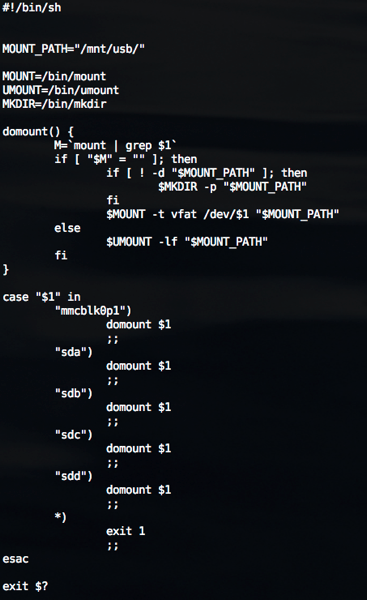
step 3. add /sbin/automount.sh like below:


automount


step 4.  Add command at /etc/rc.d/rc.sysinit

# echo /sbin/mdev > /proc/sys/kernel/hotplug

2011/04/11

Bash Introduction (4/12)

4/12 Present in Alphanetworks.


2011/02/13

The chr() in Ruby.

Cause I have to write bytes string using Ruby.

I  collation some rules of chr() to clarify my mind.

At first. create new file.

file = File.new("helloRuby", "w+")


There are three way to get the same result :

file.write(65.chr)

file.write(Integer(0x41).chr)

file.write("A")

upon three all get the hexdump result like :

00000000  41                                                |A|


And if using String.hex , ruby will write the string of hex number to file

file.write("A".hex)

00000000  31 30                                             |10|


Then, if I want to write the real hex byte to file.

I can using

file.write("A".hex.chr)

file.write(Integer(10).chr)

00000000  0a 0a                                             |..|


Important note :

chr() of Number form and chr() of String form will get the different result !


2011/02/08

Cannot identify SD card partition! (mmcblk0: unknown partition table )

Situation :

When I  plug-in my SD card into some EVB board.

SD driver can detect mmcblk0, but cannot detect SD partition.

like below:

# mmc0: new high speed SDHC card at address f7c1
mmcblk0: mmc0:f7c1 SD08G 3.50 GiB
mmcblk0: unknown partition table


But if I want to mount SD card to some folder,

I'll need to identify partition of SD card file system.


Solution :

After tracing...

Only need to enable CONFIG_MSDOS_PARTITION of kernel config.

then, the partition will be identify!!

# mmc0: new high speed SDHC card at address f7c1
mmcblk0: mmc0:f7c1 SD08G 3.50 GiB
mmcblk0: p1


螢幕快照 2011 02 09 下午3 54 36