2011/12/07

Linux Kernel Indent Rule.

This is the sample for programmer to reference. We can find the Linux Indent Rule in usr/src/linux-headers-2.6.32-35/scripts/Lindent And the indent rule is:
indent -npro -kr -i8 -ts8 -sob -l80 -ss -ncs -cp1
-npro, --ignore-profile
Do not read `.indent.pro' files.
-kr, --k-and-r-style
Use Kernighan & Ritchie coding style.
-in, --indent-leveln
Set indentation level to n spaces.
-tsn, --tab-sizen
Set tab size to n spaces.
-sob, --swallow-optional-blank-lines
Swallow optional blank lines.
-ln, --line-lengthn
Set maximum line length for non-comment lines to n.
-ss, --space-special-semicolon
On one-line for and while statements, force a blank before the semicolon.
-ncs, --no-space-after-casts
Do not put a space after cast operators.
-cpn, --else-endif-columnn
Put comments to the right of #else and #endif statements in column n.

Options

-bad, --blank-lines-after-declarations

Force blank lines after the declarations.
See BLANK LINES.
-bap, --blank-lines-after-procedures
Force blank lines after procedure bodies.
See BLANK LINES.
-bbb, --blank-lines-before-block-comments
Force blank lines before block comments.
See BLANK LINES.
-bbo, --break-before-boolean-operator
Prefer to break long lines before boolean operators.
See BREAKING LONG LINES.
-bc, --blank-lines-after-commas
Force newline after comma in declaration.
See DECLARATIONS.
-bl, --braces-after-if-line
Put braces on line after if, etc.
See STATEMENTS.
-blf, --braces-after-func-def-line
Put braces on line following function definition line.
See DECLARATIONS.
-blin, --brace-indentn
Indent braces n spaces.
See STATEMENTS.
-bls, --braces-after-struct-decl-line
Put braces on the line after struct declaration lines.
See DECLARATIONS.
-br, --braces-on-if-line
Put braces on line with if, etc.
See STATEMENTS.
-brf, --braces-on-func-def-line
Put braces on function definition line.
See DECLARATIONS.
-brs, --braces-on-struct-decl-line
Put braces on struct declaration line.
See DECLARATIONS.
-bs, --Bill-Shannon, --blank-before-sizeof
Put a space between sizeof and its argument.
See STATEMENTS.
-cn, --comment-indentationn
Put comments to the right of code in column n.
See COMMENTS.
-cbin, --case-brace-indentationn
Indent braces after a case label N spaces.
See STATEMENTS.
-cdn, --declaration-comment-columnn
Put comments to the right of the declarations in column n.
See COMMENTS.
-cdb, --comment-delimiters-on-blank-lines
Put comment delimiters on blank lines.
See COMMENTS.
-cdw, --cuddle-do-while
Cuddle while of do {} while; and preceding `}'.
See COMMENTS.
-ce, --cuddle-else
Cuddle else and preceding `}'.
See COMMENTS.
-cin, --continuation-indentationn
Continuation indent of n spaces.
See STATEMENTS.
-clin, --case-indentationn
Case label indent of n spaces.
See STATEMENTS.
-cpn, --else-endif-columnn
Put comments to the right of #else and #endif statements in column n.
See COMMENTS.
-cs, --space-after-cast
Put a space after a cast operator.
See STATEMENTS.
-dn, --line-comments-indentationn
Set indentation of comments not to the right of code to n spaces.
See COMMENTS.
-bfda, --break-function-decl-args
Break the line before all arguments in a declaration.
See DECLARATIONS.
-bfde, --break-function-decl-args
Break the line after the last argument in a declaration.
See DECLARATIONS.
-djn, --left-justify-declarations
If -cd 0 is used then comments after declarations are left justified behind the declaration.
See DECLARATIONS.
-din, --declaration-indentationn
Put variables in column n.
See DECLARATIONS.
-fc1, --format-first-column-comments
Format comments in the first column.
See COMMENTS.
-fca, --format-all-comments
Do not disable all formatting of comments.
See COMMENTS.
-gnu, --gnu-style
Use GNU coding style. This is the default.
See COMMON STYLES.
-hnl, --honour-newlines
Prefer to break long lines at the position of newlines in the input.
See BREAKING LONG LINES.
-in, --indent-leveln
Set indentation level to n spaces.
See INDENTATION.
-iln, --indent-labeln
Set offset for labels to column n.
See INDENTATION.
-ipn, --parameter-indentationn
Indent parameter types in old-style function definitions by n spaces.
See INDENTATION.
-kr, --k-and-r-style
Use Kernighan & Ritchie coding style.
See COMMON STYLES.
-ln, --line-lengthn
Set maximum line length for non-comment lines to n.
See BREAKING LONG LINES.
-lcn, --comment-line-lengthn
Set maximum line length for comment formatting to n.
See COMMENTS.
-linux, --linux-style
Use Linux coding style.
See COMMON STYLES.
-lp, --continue-at-parentheses
Line up continued lines at parentheses.
See INDENTATION.
-lps, --leave-preprocessor-space
Leave space between `#' and preprocessor directive.
See INDENTATION.
-nlps, --remove-preprocessor-space
Remove space between `#' and preprocessor directive.
See INDENTATION.
-nbad, --no-blank-lines-after-declarations
Do not force blank lines after declarations.
See BLANK LINES.
-nbap, --no-blank-lines-after-procedures
Do not force blank lines after procedure bodies.
See BLANK LINES.
-nbbo, --break-after-boolean-operator
Do not prefer to break long lines before boolean operators.
See BREAKING LONG LINES.
-nbc, --no-blank-lines-after-commas
Do not force newlines after commas in declarations.
See DECLARATIONS.
-nbfda, --dont-break-function-decl-args
Don't put each argument in a function declaration on a separate line.
See DECLARATIONS.
-ncdb, --no-comment-delimiters-on-blank-lines
Do not put comment delimiters on blank lines.
See COMMENTS.
-ncdw, --dont-cuddle-do-while
Do not cuddle } and the while of a do {} while;.
See STATEMENTS.
-nce, --dont-cuddle-else
Do not cuddle } and else.
See STATEMENTS.
-ncs, --no-space-after-casts
Do not put a space after cast operators.
See STATEMENTS.
-ndjn, --dont-left-justify-declarations
Comments after declarations are treated the same as comments after other statements.
See DECLARATIONS.
-nfc1, --dont-format-first-column-comments
Do not format comments in the first column as normal.
See COMMENTS.
-nfca, --dont-format-comments
Do not format any comments.
See COMMENTS.
-nhnl, --ignore-newlines
Do not prefer to break long lines at the position of newlines in the input.
See BREAKING LONG LINES.
-nip, --no-parameter-indentation
Zero width indentation for parameters.
See INDENTATION.
-nlp, --dont-line-up-parentheses
Do not line up parentheses.
See STATEMENTS.
-npcs, --no-space-after-function-call-names
Do not put space after the function in function calls.
See STATEMENTS.
-nprs, --no-space-after-parentheses
Do not put a space after every '(' and before every ')'.
See STATEMENTS.
-npsl, --dont-break-procedure-type
Put the type of a procedure on the same line as its name.
See DECLARATIONS.
-nsaf, --no-space-after-for
Do not put a space after every for.
See STATEMENTS.
-nsai, --no-space-after-if
Do not put a space after every if.
See STATEMENTS.
-nsaw, --no-space-after-while
Do not put a space after every while.
See STATEMENTS.
-nsc, --dont-star-comments
Do not put the `*' character at the left of comments.
See COMMENTS.
-nsob, --leave-optional-blank-lines
Do not swallow optional blank lines.
See BLANK LINES.
-nss, --dont-space-special-semicolon
Do not force a space before the semicolon after certain statements. Disables `-ss'.
See STATEMENTS.
-nut, --no-tabs
Use spaces instead of tabs.
See INDENTATION.
-nv, --no-verbosity
Disable verbose mode.
See MISCELLANEOUS OPTIONS.
-orig, --original
Use the original Berkeley coding style.
See COMMON STYLES.
-npro, --ignore-profile
Do not read `.indent.pro' files.
See INVOKING INDENT.
-pcs, --space-after-procedure-calls
Insert a space between the name of the procedure being called and the `('.
See STATEMENTS.
-pin, --paren-indentationn
Specify the extra indentation per open parentheses '(' when a statement is broken.See STATEMENTS.
-pmt, --preserve-mtime
Preserve access and modification times on output files.See MISCELLANEOUS OPTIONS.
-ppin, --preprocessor-indentationn
Specify the indentation for preprocessor conditional statements.See INDENTATION.
-prs, --space-after-parentheses
Put a space after every '(' and before every ')'.
See STATEMENTS.
-psl, --procnames-start-lines
Put the type of a procedure on the line before its name.
See DECLARATIONS.
-saf, --space-after-for
Put a space after each for.
See STATEMENTS.
-sai, --space-after-if
Put a space after each if.
See STATEMENTS.
-saw, --space-after-while
Put a space after each while.
See STATEMENTS.
-sbin, --struct-brace-indentationn
Indent braces of a struct, union or enum N spaces.
See STATEMENTS.
-sc, --start-left-side-of-comments
Put the `*' character at the left of comments.
See COMMENTS.
-sob, --swallow-optional-blank-lines
Swallow optional blank lines.
See BLANK LINES.
-ss, --space-special-semicolon
On one-line for and while statements, force a blank before the semicolon.
See STATEMENTS.
-st, --standard-output
Write to standard output.
See INVOKING INDENT.
-T

Tell indent the name of typenames.

See DECLARATIONS.
-tsn, --tab-sizen
Set tab size to n spaces.
See INDENTATION.
-ut, --use-tabs
Use tabs. This is the default.
See INDENTATION.
-v, --verbose
Enable verbose mode.
See MISCELLANEOUS OPTIONS.
-version
Output the version number of indent.
See MISCELLANEOUS OPTIONS.

2011/11/17

VIM with tags

Using vim coding program for a long time. It's a very good tool "ctags" to work with vim when coding.

Create tags

#ctags -R *

Naming tags

#ctags -R * -f tagName

In vim, using below command to setting PATH of tags:

:set tags=./tags,../tags

or

:set tags=tags; Add ; can recursive search tags from parent folder.

2011/11/10

[C/C++ basic] Preprocessing #if defined(SHAWN)

It's lot of usage same as #ifdef Like #if defined(...) When using #if defined(...) we can used logic AND/OR for preprocessing.

Sample 1:

#ifdef ABC
// do something
#elif DEF
// do something
#else
// do something else
#endif

Sample 1 above can be simply recoding as:

#if defined(ABC) || defined(DEF)
//do something
#else
// do something else
#endif

2011/11/04

[C/C++ basic] Preprocessing #ifdef, #elif, #else

Today I using C/C++ preprocessor to compile my code, But I have a little confuse about "is #elif can work correctly with #ifdef"?
#ifdef TEST_IFDEF
	printf("Test #ifdef");
#elif TEST_ELIF
	printf("Test #elif");
#else
	printf("Test #else");
#endif
And after my trying. It's work well :D

2011/09/26

[C/C++]switch-case with range?

There is an interesting discussed after today study group. Is C/C++ support switch-case with range of integer!? Let see a example :
//===================
switch (a)
{
	case 1 ... 10:
		//do somthing
		break;

	case 11 ... 20:
		//do somthing
		break;
	default:
		//do something 
		break;
}
//===================
This is successfully with gcc compiler. But not done with VC++ That's because Standard C doesn't support switch-case with range. I found the answer from http://c-faq.com/misc/nonconstcase.html If using gcc with option -pedantic, then will be error occur when compile like below: warning: range expressions in switch statements are non-standard unless you are clarify what are you doing, and understand the code portable issue. DONOT using switch-case with range! (my own suggestion...)

2011/04/19

Using mii-tool/ethtools to sniff status of network interface

When I am trying using mii-tool on my new develop environment, Some error occur, and the log message like below:
# mii-tool -V mii-tool.c 1.9 2000/04/28 00:56:08 (David Hinds) SIOCGMIIPHY on 'eth0' failed: Operation not supported no MII interfaces found
Then I google this problem find out, mii-tool has lot of bug, and some net drivers didn't support it. So, I am trying using ethtool which have more compatibility. And it work great!!
# ethtool eth0 Settings for eth0: Supported ports: [ TP MII ] Supported link modes: 10baseT/Half 10baseT/Full 100baseT/Half 100baseT/Full Supports auto-negotiation: Yes Advertised link modes: 10baseT/Half 10baseT/Full 100baseT/Half 100baseT/Full Advertised auto-negotiation: Yes Speed: 100Mb/s Duplex: Full Port: MII PHYAD: 1 Transceiver: internal Auto-negotiation: on Link detected: yes
So, If just want to know about network status, Maybe ethtool is better than mii-tool, But, unfortunately, I still need to resolving mii-tool's problem for our environment. So, If you meet the trouble about "no MII interfaces found", make sure the mii-tool is follow up the newest one release. It would possible make the trouble disappear...or not...OTZ

2011/04/13

Mac OS disable/enable .DS_Store

Mac OS will create .DS_Store on Network Disk. And it would confused the other operation system user. This is the way to disable auto create .DS_Store. defaults write com.apple.desktopservices DSDontWriteNetworkStores true

vbindiff : Good tools for compare binary files.

vbindiff is a graphical windows tools for compare binary file. It can easy find out what bytes different in ASCII or EBCDIC mode. more information in manual page :) SYNOPSIS vbindiff file1 [ file2 ] DESCRIPTION Movement Keys ------------- Up Move one line (16 bytes) towards the beginning of the file Down Move one line (16 bytes) towards the end of the file Left Move one byte towards the beginning of the file Right Move one byte towards the end of the file PageUp Move one page towards the beginning of the file PageDn Move one page towards the end of the file Home Move to the beginning of the file End Move to the end of the (shorter) file F Search for a string or byte sequence G Move to a specified file position Other Keys ---------- Enter Move to the next difference between the files Space (same as Enter) C Toggle between ASCII and EBCDIC display E Edit currently displayed section of file Esc Exit VBinDiff Q Exit VBinDiff

2011/04/12

SD card automount for Embedded Linux

If we want to using SD card auto mount.

Please reference manual page of command "mdev".

#  mdev --helpBusyBox v1.18.4 (2011-04-01 22:32:35 CST) multi-call binary.
Usage: mdev [-s]
-s      Scan /sys and populate /dev during system boot
It can be run by kernel as a hotplug helper. To activate it: echo /sbin/mdev > /proc/sys/kernel/hotplug

It uses /etc/mdev.conf with lines[-]DEVNAME UID:GID PERM [>|=PATH] [@|$|*PROG]


Follow above information.

step 1. make sure build the feature "hotplug" to kernel

step 2. edit /etc/mdev.conf like below :

sd.*    0:0     660     */sbin/automount.sh     $MDEV

mmc.*   0:0     660     */sbin/automount.sh     $MDEV

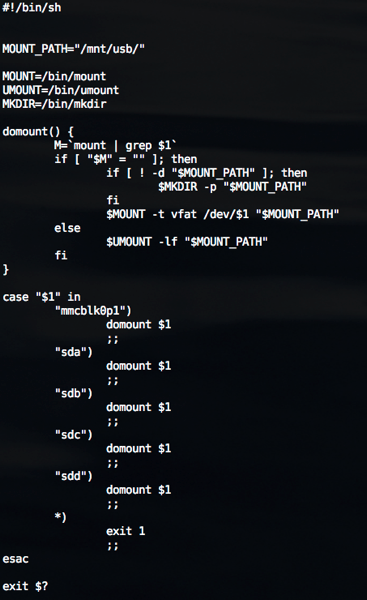
step 3. add /sbin/automount.sh like below:


automount


step 4.  Add command at /etc/rc.d/rc.sysinit

# echo /sbin/mdev > /proc/sys/kernel/hotplug

2011/04/11

Bash Introduction (4/12)

4/12 Present in Alphanetworks.


2011/02/13

The chr() in Ruby.

Cause I have to write bytes string using Ruby.

I  collation some rules of chr() to clarify my mind.

At first. create new file.

file = File.new("helloRuby", "w+")


There are three way to get the same result :

file.write(65.chr)

file.write(Integer(0x41).chr)

file.write("A")

upon three all get the hexdump result like :

00000000  41                                                |A|


And if using String.hex , ruby will write the string of hex number to file

file.write("A".hex)

00000000  31 30                                             |10|


Then, if I want to write the real hex byte to file.

I can using

file.write("A".hex.chr)

file.write(Integer(10).chr)

00000000  0a 0a                                             |..|


Important note :

chr() of Number form and chr() of String form will get the different result !


2011/02/08

Cannot identify SD card partition! (mmcblk0: unknown partition table )

Situation :

When I  plug-in my SD card into some EVB board.

SD driver can detect mmcblk0, but cannot detect SD partition.

like below:

# mmc0: new high speed SDHC card at address f7c1
mmcblk0: mmc0:f7c1 SD08G 3.50 GiB
mmcblk0: unknown partition table


But if I want to mount SD card to some folder,

I'll need to identify partition of SD card file system.


Solution :

After tracing...

Only need to enable CONFIG_MSDOS_PARTITION of kernel config.

then, the partition will be identify!!

# mmc0: new high speed SDHC card at address f7c1
mmcblk0: mmc0:f7c1 SD08G 3.50 GiB
mmcblk0: p1


螢幕快照 2011 02 09 下午3 54 36


2010/09/27

UNIX Programming

9/28 Present at Alpha networks.

Reference Books:
Advanced Programming in the UNIX Environment 2nd.
(W. Richard Stevens & Stephen A. Rago)


2010/09/06

Linux Man-Pages Release - 3.26

Linux Man-Pages 3.26 release.


Download from git :

git clone git://git.kernel.org/pub/scm/docs/man-pages/man-pages.git

Downliad tarball


Release Notes:
http://www.kernel.org/doc/man-pages/changelog.html#release_3.26

2010/08/22

Vim plugin - Doxygen

# 1. DoxygenToolkit.vim

let g:doxygenToolkit_authorName="your name"

Usages:

:Dox
:DoxAuthor
:DoxBlock
:DoxUndoc(DEBUG)
:DoxLic


# 2. Doxygen.vim
cd ~/.vim/after/syntax;
ln -s doxygen.vim c.vim;
ln -s doxygen.vim cpp.vim;
ln -s doxygen.vim java.vim;

2010/08/10

vimgrep


:vimgrep /pattern/[g][j] file1 file2 ... fileN

vimgrep is using to search pattern from following filelist.

vimgrep accept to ignore case,
If want to using this feature, put /\c in the pattern to ignore case.
ex:  vimgrep /pattern\c/ filename

or put /\C in the pattern to match it.
ex:  vimgrep /PaTtErn\c/ filename

Without flag 'j', vim jumps to the first match.
With flag 'j', vim only quickfix list is updated.

You can using :clist to list all match location.
and using :cc N to jump to the match.

:cn can jump to the next match location.
:cN can jump back prior match.


more usage, please using :help vimgrep

2010/07/19

vim 一次註解多行


使用VIM時, 註解多行的方式如下:

1. 進入 command mode ,
2. 按ctrl-V, 然後圈選要註解的區塊
3. 按 I 進入 Insert mode
4. 鍵入註解符號或要輸入的內容
5. 按 ESC 兩次, 就可以看到輸入的註解已經套用在所選擇的那幾行

note: 步驟三的 I 可以替換成 A, 這樣就會變成在行尾註解


在C/C++ 註解多行其實可以透過下面的方式簡單完成,
但 VIM 的多行註解則適用於各式語言喔!

#if 0

... 要註解的部份

#endif

vim 加密功能

Command Line 底下執行 VIM 時, 加上 -X 即可開啟檔案加密模式.

# vim -X [檔名]

這樣 vim 在開啟檔案時會要求使用者輸入密碼, 若原本沒有密碼, 則會要求建立密碼.

若密碼輸入錯誤, 同樣可以開啟檔案, 不過內容會呈現亂碼.

加密功能亦可以在編輯檔案時, 透過 :x 指令來加密.

不過要注意檔案在編輯時, vim 自動產生的 swap 檔案是沒有加密的,

因此在編輯檔案時可以考慮將 swap 功能關閉.

使用方法如下:

#vim -X 檔名 -n

或是檔案編輯中使用 :set noswf即可.

2010/03/29

Apple release Mac OS X 10.6.3 with QuickTime X, OpenGL improvements

昨天蘋果釋出 Mac OS 10.6.3 更新雪豹作業系統,

主要改進了QuickTime X 和 OpenGL-base應用程式定址相容性問題.

蘋果建議使用Snow Leopard 的使用者 update 到 10.6.3 版,

這次的更新共佔 437.2 MB的空間.

概略更新的項目如下:

  • Improves the reliability and compatibility of QuickTime X
  • Addresses compatibility issues with OpenGL-based applications
  • Addresses an issue that causes background message colors to display incorrectly in Mail
  • Resolves an issue that prevented files with the # or & characters in their names from opening in Rosetta applications
  • Resolves an issue that prevented files from copying to Windows file servers
  • Improves performance of Logic Pro 9 and Main Stage 2 when running in 64-bit mode
  • Improves sleep and wake reliability when using Bonjour wake on demand
  • Addresses a color issue in iMovie with HD content
  • Improves printing reliability
  • Resolves issues with recurring events in iCal when connected to an Exchange server
  • Improves the reliability of 3rd party USB input devices
  • Fix glowing, stuck, or dark pixels when viewing video from the iMac (Late 2009) built-in iSight camera

Reference : http://www.appleinsider.com/articles/10/03/29/apple_releases_mac_os_x_10_6_3_with_quicktime_x_opengl_improvements.html

2010/03/26

Transport Stream Format.

簡介:

Transport Stream (傳輸串流) 簡稱 TS, 主要根據 ITU-T Rec. H.262 | ISO/IEC 13818-2 and ISO/IEC 13818-3制定而成.

Transport Stream 包含了一個或以上的 Program (節目),

Program 由 Video , Audio 和節目資訊(PSI) 組成,

而 Video 和 Audio 的 Elementary Stream 將被拆解裝載到 PES Packets.

而 PSI 則分為四種如下所列:

  • Program Association Table
  • Program Map Table
  • Conditional Access Table
  • Network Information Table

TS 結構分析 :

TS 的長度是固定的, 每個 TS Packet 都是 188 Bytes.

而前四個 Bytes 為同步字元(0x47),

之後則為 PID 等資訊,

解碼時, Client 端裝置會先根據 PID 找到 PAT 表,

在透過 PAT 表內提供的 PMT 之 PID 來找到PMT 所在的位置,

最後再從 PMT 中找到相對應的資料串流, 開始解碼.

因此 , PAT 和 PMT 表是一定必須要提供的部份!

TS_Packet.jpg

PAT 結構:


PAT_Table.jpg

  • table_id : 8 bit, PAT table ID 固定為 0x00
  • section_syntax_indicator : 1 bit,
  • '0' : 1 bit
  • reserved : 2 bits
  • section_length : 12 bits, ( 0xB000 | PAT HeaderLength )
  • transport_stream_id : 16 bits
  • reserved : 2 bits
  • version_number : 5 bits
  • current_next_indicator : 1 bit.
  • section_number : 8 bits,
  • last_section_number : 8 bits,
  • program_number : 16 bits, 與 PMT 表中 program_number 對應
  • reserved : 3 bits
  • network_PID or program_map_PID : 當 program_number == 0 為 networks PID, 反之為 program PID.
  • CRC_32

PMT 結構:


PMT_Table.jpg

  • table_id : 8 bit, PMT table ID 固定為 0x02
  • section_syntax_indicator : 1 bit,
  • '0' : 1 bit
  • reserved : 2 bits
  • section_length : 12 bits, ( 0xB000 | PMT HeaderLength )
  • program_number : 16 bits, (和 PAT 表中的 Program_number 對應)
  • reserved : 2 bits,
  • version_number : 5 bitts,
  • current_next_indicator : 1 bit.
  • section_number : 8 bits,
  • last_section_number : 8 bits,
  • reserved : 3 bits,
  • PCR_PID : 13 bits,
  • reserved : 4 bits,
  • program_info_length : 12 bits,
  • stream_type : 8 bits, (MPEG4 : 0x10, H.264 : 0x1B , etc ...)
  • reserved : 3 bits,
  • elementary_PID : 13 bits,
  • reserved : 4 bits
  • ES_info_length : 12 bits,
  • CRC32 : 32 bits